Use environment variables for runtime configuration and secret files for values an application reads from disk. Keep credentials out of Git, container images, and public build output. Bex stores managed secret values in its configured credential backend and projects them into eligible workloads.
Reading sensitive values requires appropriate workspace permissions and OAuth scopes. Application code can still print or expose a secret: storing it securely does not prevent an application from leaking it.
Edit in the dashboard
Open the service's Environment page, choose Edit, and stage the variables or secret files you need. Reveal existing values only when necessary.
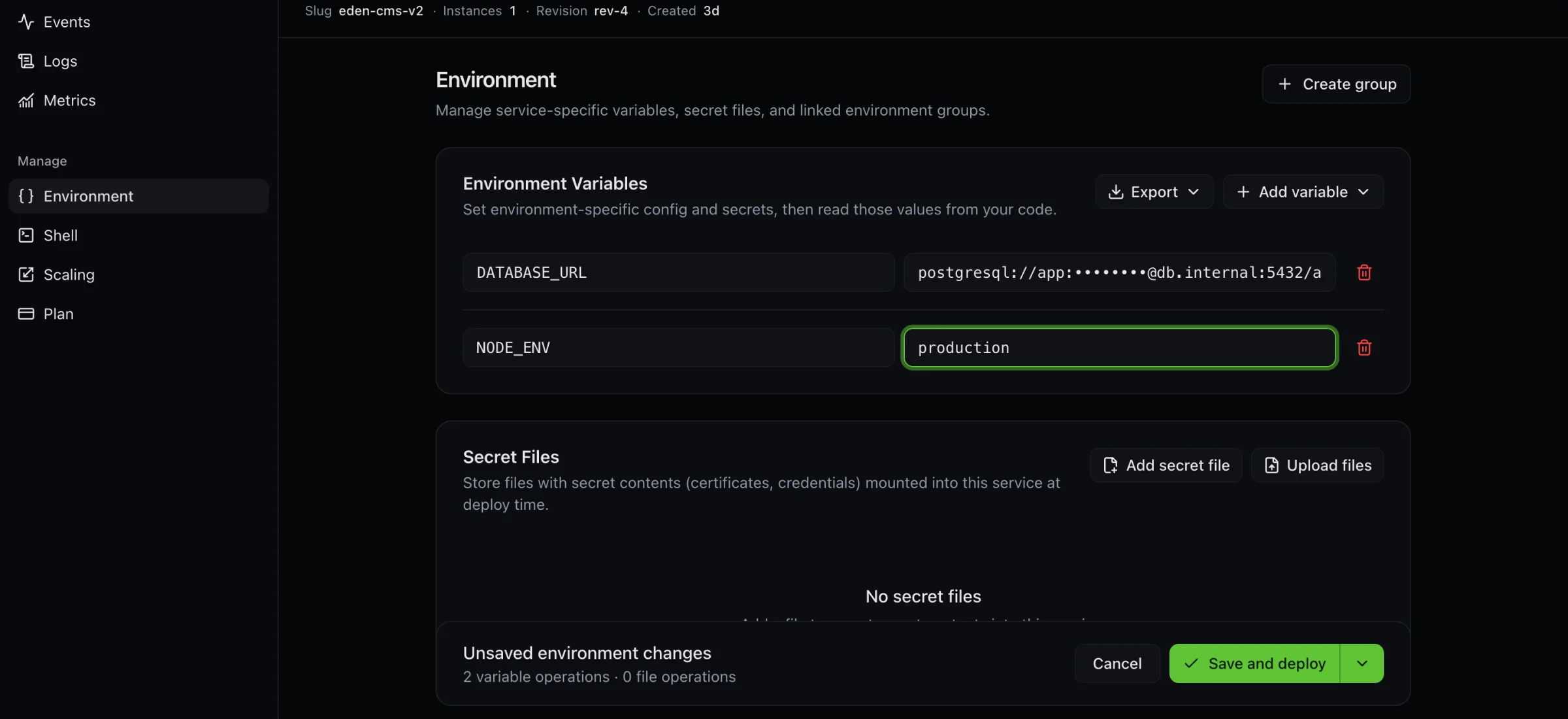
Choose when the saved configuration should take effect:
- Save only stages the configuration without rolling the running service.
- Save and deploy activates the configuration with a service rollout.
- Save, rebuild, and deploy saves first, then requests a source deployment. If deployment fails after saving, retry the deployment; do not assume the configuration save was undone.
A successful save is distinct from a healthy deployment. Inspect deploy state and application behavior afterward. Services with persistent disks can be interrupted during rollout; there is no universal no-downtime promise.
Update one variable through REST
Set BEX_API_URL and BEX_TOKEN using API authentication, and use the
returned service ID. This example adds a non-sensitive configuration value:
export BEX_SERVICE_ID='replace-with-service-id'

curl --fail-with-body --silent --show-error \
  -X PUT "$BEX_API_URL/v1/services/$BEX_SERVICE_ID/env-vars/LOG_LEVEL" \
  -H "Authorization: Bearer $BEX_TOKEN" \
  -H 'Content-Type: application/json' \
  -d '{"value":"info"}'
The single-key route preserves other variables. It returns the written value
and starts the normal configuration rollout. When writing real secrets, supply
request data from a protected file or secret store, and avoid logging the
request or response. DELETE …/env-vars/{key} removes one variable.
PUT …/env-vars replaces the entire service-managed set. Its body is a raw
array, such as [{"key":"LOG_LEVEL","value":"info"}], not an envVars
wrapper. Keys omitted from that array are removed from that set. Use the
single-key route or a sparse patch when you intend a small edit.
Save a sparse patch without deploying
The Bex batch endpoint applies only the supplied changes, preserving omitted variables and files. Unlike the individual-value routes, its result contains names and rollout state rather than secret material:
curl --fail-with-body --silent --show-error \
  -X PATCH "$BEX_API_URL/v1/services/$BEX_SERVICE_ID/environment" \
  -H "Authorization: Bearer $BEX_TOKEN" \
  -H 'Content-Type: application/json' \
  -d '{"saveMode":"save_only","envVars":[{"key":"LOG_LEVEL","value":"debug"}]}'
Use saveMode: "deploy" to activate changes and roll the service once.
A source rebuild is a separate deployment action after saving. For clients
editing a previously loaded draft, the endpoint also supports
expectedEnvRevision to detect a conflicting edit; refresh before retrying a
revision conflict rather than overwriting another editor's changes.
Secret files
Secret files are available at runtime under /etc/secrets/<name>. Use a simple
filename, not a path traversal or an absolute path. Upload or replace one with
PUT /v1/services/{id}/secret-files/{name} and body {"content":"…"}.
List names with GET …/secret-files; retrieving one file's contents is a separate
sensitive read. Deleting one uses DELETE …/secret-files/{name}.
Changing a file through the individual endpoint triggers the configuration rollout. Do not assume a runtime secret file is available during a Docker image build. Static sites publish browser-readable output; any credential embedded in that output is public.
Share configuration with environment groups
Create a group in Environment Groups, add its variables/files, and link it
to the intended services. The API uses /v1/env-groups for group management;
link with POST /v1/env-groups/{id}/services/{serviceId} and unlink with DELETE
on the same path.
Service-specific environment values override a colliding group value. Avoid collisions between groups, and review every linked service before changing shared configuration. Environment-scoped groups can only link within their allowed scope. Sharing a group is a configuration operation, not a substitute for workspace access control.
Blueprints and rotation
render.yaml supports literals, group references, datastore
references, generateValue, and sync: false within its validated schema.
Keep secret literals out of committed manifests. A generated value is suitable
for a new secret; when migrating, deliberately transfer keys that must remain
compatible with existing data or sessions.
For rotation, issue the replacement at the external provider when applicable, update Bex, activate the new configuration, verify consumers, and then revoke the old credential. Merely changing an environment variable does not rotate a credential at its issuer. For a runnable local rehearsal and revision-checked update shape, see Credential rotation and the credential-rotation sample.
If the API reports the secrets backend unavailable, ask the platform operator to check its configuration and connectivity. If saving succeeds but the service still uses an old value, check save mode, deployment state, group overrides, and whether the application reads that value at build time or runtime.
Self-hosted operators rehearsing OpenBao itself (not tenant env vars) use Recovery: OpenBao with the shared Platform recovery preparation steps.